
Start syncing your data?
Sync checks your local log and Drive file and merges changes. If both copies changed the same record, you choose which version to keep.
New features are here!
Back up your records before updating.
Save an original backup to this device or Google Drive, then choose “Backup saved — update”. Your saved ratings will stay the same. You can still view and export records while you wait, but recording, editing and loading backups are paused.
What’s new
- More ways to capture context: select multiple tags, create your own tags and record how full your emotion bucket feels. Choose ratings out of 5 or 10 in Advanced settings.
- Improved charts to explore your most recorded tags and how emotions relate to tags and bucket levels.
- Improved Logs and filters: combine dates, search, multiple emotions, tags, bucket levels, expected and actual intensity, and alignment.
- Choose Custom on Charts to use the same filters for your analysis.
These extra capture fields are optional. Your existing records and older backups remain supported.
Record your emotions and explore patterns over time.
Capture settings — Phase 1: Emotion only
Choose how much detail to record.
- Phase 1: Record just the emotion.
- Phase 2: Also record how strong the emotion feels, whether it fits the situation and how your body feels.
- Phase 3: Everything in Phase 2, plus tags, such as Work or Family, and how full your emotional bucket feels.
- Custom: Choose which questions to include.
Advanced settings — ratings out of 5
Choose ratings out of 5 or 10 for emotion strength and your emotional bucket. This applies whichever phase you use.
If you have saved records, you’ll be asked to save a backup and confirm before their ratings are changed.
Change rating scale
This changes all saved emotion strength and bucket ratings. Anything you did not record stays Not recorded.
Save an original backup to this device or Google Drive before changing your ratings.
View the visual emotion wheel
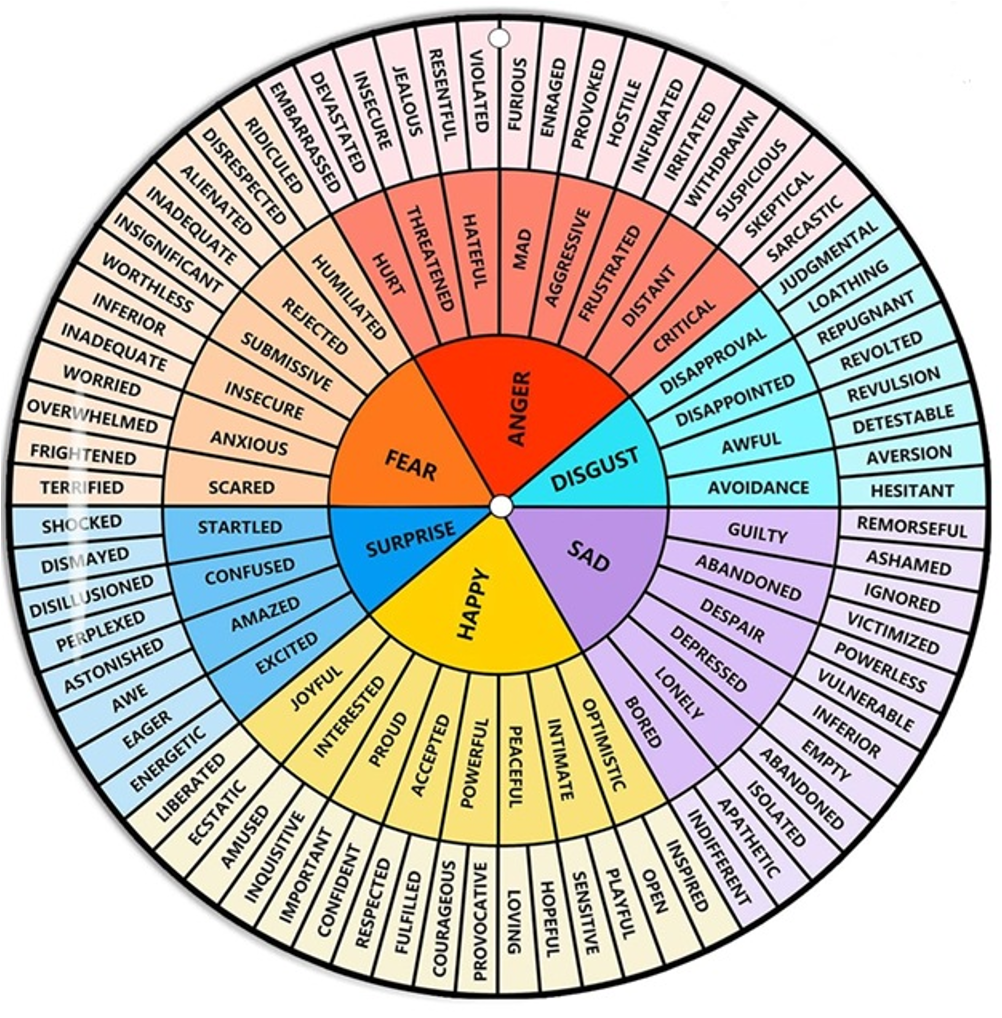
Emotion reference table
Choose any emotion word in a row to prepare that complete path as a new entry. The round colour marker identifies the inner-circle emotion category; the written label carries the same information without relying on colour.
| Inner circle | Middle circle | Outer circle |
|---|
Step 1: Inner circle
Step 2: Middle circle
Choose an inner-circle emotion first.
Step 3: Outer circle
Choose a middle-circle emotion first.
Review and record
No emotion selected yet.
Start by choosing an inner-circle emotion.
Emotion recorded
Your emotion was saved on this device.
Copy data
If automatic sharing or copying is not available, select the text below and use the browser copy command.
My emotion log
Records are stored in this browser. Optional Drive sync shares changes only when you enable it.
No emotions recorded yet.
Entry deleted.
Emotion tally
Swipe or scroll the table horizontally to see every column.
| Recorded level | Inner circle | Middle circle | Outer circle | Times felt | Last recorded |
|---|---|---|---|---|---|
| No emotions recorded yet. | |||||
Recent entries
Swipe or scroll the table horizontally to see every column.
| Date and time | Recorded level | Inner circle | Middle circle | Outer circle | Appropriate | Expected intensity | Actual intensity | Alignment | Physical sensations | Tags | Emotion bucket level | Note | Actions |
|---|---|---|---|---|---|---|---|---|---|---|---|---|---|
| No emotions recorded yet. | |||||||||||||
Charts
No emotions recorded yet.
Showing all time
Advanced filters
Filter all charts using search, dates and any combination of the fields below.
Most recorded tags
Most recorded tags
Counts and percentages use all entries in the selected period. Each tag counts once per entry; totals can exceed 100%. Select a bar to review matching logs.
| Tag | Entries | Percentage of entries |
|---|
Emotions by tag
Emotions by tag
| Emotion | Entries | Percentage of matching entries |
|---|
Emotions by bucket level
Emotions by bucket level
Cell numbers show entry counts; darker cells mean more entries. The highest level is full. Select a cell to review matching logs. Detailed emotions are grouped under their inner-circle category.
Most recorded emotions
Most recorded emotions
No emotion records available yet.
| Emotion path | Times felt | Last recorded |
|---|---|---|
| No emotions recorded yet. | ||
Recorded level mix
Recorded level mix
No recorded levels available yet.
| Recorded level | Records |
|---|---|
| No emotions recorded yet. | |
Records over time
Records over time
No dates available yet.
| Date | Records |
|---|---|
| No emotions recorded yet. | |
Reflection summary
Reflection summary
No reflection data available yet.
Appropriate responses
No appropriate response data recorded yet.
| Response | Records |
|---|---|
| No appropriate response data recorded yet. | |
Intensity alignment
No intensity alignment data recorded yet.
| Alignment | Records |
|---|---|
| No intensity alignment data recorded yet. | |
Intensity averages
| Metric | Value |
|---|---|
| No intensity values recorded yet. | |
Tags
Each selected tag counts once per entry, so tag totals can exceed the number of records.
| Tag | Records |
|---|
Emotion bucket levels
Levels use a scale from 1 to 5, where 5 is full. Missing levels are excluded from the average.
| Level | Records |
|---|
Most common physical sensations
No physical sensations recorded yet.
| Physical sensation | Records |
|---|---|
| No physical sensations recorded yet. | |
Local data — back up or load a file
These controls use your data on this device. Save a backup file to your device, or load a file to add records or replace your local log. CSV exports can be read in a spreadsheet.
Google Drive (optional)
Google Drive is disconnected.
Connect your Google account to save your data online or open files people have shared with you. Google Drive is optional.
Saving and automatic sync
Save to Drive checks both copies and merges changes. Automatic sync does this every 15 seconds while the page is open and connected. Conflicting versions need your choice. Your current file keeps the same sharing link.
You are viewing another dataset. Switch to My local data before saving, starting sync or restoring your own data. Any automatic sync already running continues to sync only your own local data.
Sync off. Not synced yet.
Resolve conflicting changes
Choose which version to keep for each conflicting record. Other changes are merged automatically. Both original copies will be saved as recovery backups first.
Your Drive backups
Connect Google to see your dated backups.
| Backup name | Created | Comment | Actions |
|---|
Move backup to Trash?
Advanced Backup Settings
Extra backups are listed oldest first. You choose whether to move them to Trash; your current file is always kept.
Current file: Emotion Wheel / Emotion Wheel current.json
Backups: Emotion Wheel / Backups / date/time - backup name - optional comment.json
Review older backups
Restore a Drive backup
You selected a backup from your Emotion Wheel / Backups folder. Restoring replaces your local data and your current Drive file, including ratings and capture settings. People you share with will see the restored data. Automatic sync pauses until you start it again.
Your device and current Drive data will be saved as recovery backups before anything is replaced. Other devices with unsynced changes must review them before syncing.
Share My Data
Give someone read-only access to your current Drive file, then send them the link. It stays up to date when you save or sync. Google checks their account before opening it.
Connect Google to see who has access.
| Person | Permission | Actions |
|---|
The link is the same for everyone. Stopping access cannot remove copies already downloaded.
Stop sharing?
Add a person
They can view and download all records, including notes. They cannot edit your Drive file.
Add an optional note
Capture a thought, situation, or anything else you want to remember with this entry. It is saved with your record, including in any exports or Google Drive backups and sync you choose.